Bet Tracker
Log every bet and see your real edge — P&L, ROI, strike rate and closing-line value over time.
Open Bet Tracker →Overview
The Bet Tracker is your record of every bet you place. Log a bet in seconds, settle it when the result is in, and the tracker keeps a running picture of your performance: profit and loss, return on investment, strike rate, and — the number serious bettors care about most — your closing-line value.
Your bets live in your account, so they are safe across devices and survive clearing your browser. Signed out, they save on this device.
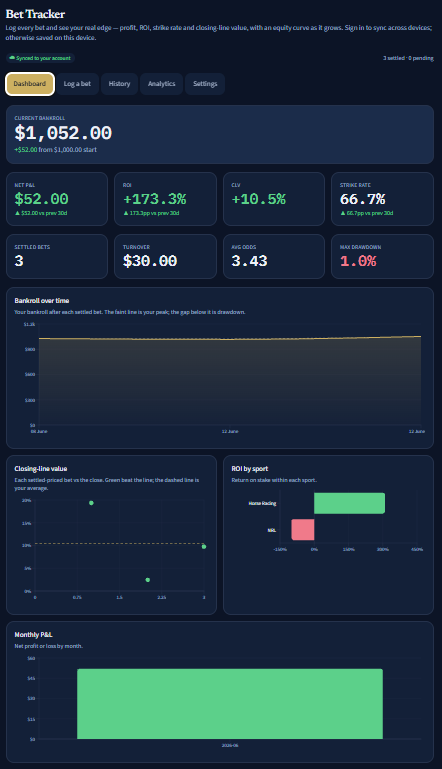
Why closing-line value matters
Closing-line value (CLV) compares the odds you took to the final, “closing” odds just before the event. Consistently beating the close is the single most reliable sign that you are finding genuine value — over time it predicts profit far better than a few lucky results do.
Enter the odds you took when you log a bet; add the closing odds whenever you have them (the tracker keeps them as a separate record, so nothing you logged is ever overwritten). The tracker then shows your average CLV and how often you beat the close.
How to use it
- 1Set your starting bankroll and currency in Settings.
- 2Log a bet: sport, market, selection, bookmaker, the odds you took and your stake.
- 3Settle it with one tap — win, loss, void, or a half result for each-way / dead-heat.
- 4When you know the closing odds, open the bet in History and add them.
- 5Watch your dashboard: net P&L, ROI, strike rate and CLV, with an equity curve as it grows.
Reading the outputs
- Net P&L — your total profit or loss across settled bets.
- ROI / yield — profit as a percentage of what you staked (yield excludes voided stakes).
- Strike rate — the share of decisive bets that won.
- CLV — average closing-line value and how often you beat the close (the skill signal).
- Equity curve & drawdown — how your bankroll has moved, and the worst dip along the way.
Fixing mistakes
Logged a bet wrong? Use “correct” in History. The tracker never edits or deletes the original — it records a correction on top, so your history stays a trustworthy, tamper-evident record.
Bringing in bets you already have
You can import a spreadsheet of past bets instead of retyping them: Bet Tracker → Settings → Import. It reads .csv and Excel .xlsx.
The import matches your spreadsheet on its column headers, so the headers have to be named the way it expects: date, sport, market, selection, bookmaker, odds_taken, odds_closing, stake, result. A file needs at least odds_taken and stake to import at all; rename the columns in your spreadsheet first if they differ. Rows it cannot read are skipped and counted, so the confirmation tells you exactly how many bets went in and how many were passed over.
Free vs Pro
Free covers logging and your basic P&L with a 30-day view of history. Pro unlocks the full history, the CLV analytics and distribution chart, the equity and drawdown charts, breakdowns by sport / market / bookmaker, CSV / Excel import and export, and unlimited bankrolls.
FAQ
- Where do I get the closing odds?
- From your bookmaker or an odds service at the off / event start. You add them yourself — the tracker does not fetch odds in this version.
- Do I have to add closing odds?
- No. Everything else works without them; CLV simply needs them. Add them to the bets you can, and the CLV figures use that sample.
- Is my data private?
- Yes. When signed in, your bets are stored under your account and only you can read them (enforced at the database level).
Responsible play
A staking plan changes how much you stake, not whether a bet wins, and nothing removes the house edge. These tools are educational calculators — they do not place bets, take money, or give tips.
Set a daily loss limit and, if you need a break, a cool-off in Settings. Never stake money you cannot afford to lose. Free, confidential support: National Gambling Helpline 1800 858 858 (24/7).
What's free, what's not
Free covers logging and your basic P&L with a 30-day history view. Pro unlocks full history, closing-line-value analytics and charts, breakdowns by sport / market / bookmaker, and CSV / Excel import and export. Your data is never trimmed — only some views wait for Pro.
One email a month on staking systems and bankroll maths — no tips, ever.
OutlayHQ is educational staking & bankroll-management calculator software. It does not place bets, take money, or provide betting tips. Gambling involves risk — never bet more than you can afford to lose. For free, confidential support call the Australian National Gambling Helpline on 1800 858 858.